your bio link · custom short links

Share you on drippy.link

Connecting the world to you

Drop my.drippy.link/@yourhandle anywhere you share.

  • Public page at my.drippy.link/@yourhandle
  • Short links on drippy.link
  • Stats and QRs where available
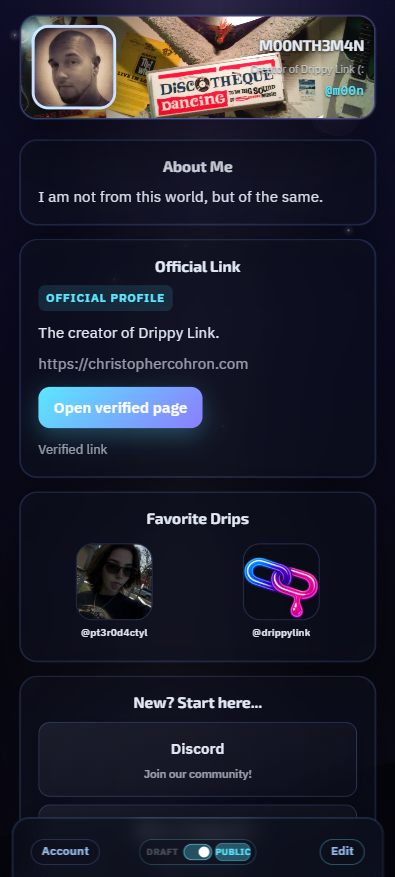
Example link page: profile header and Drops on a phone.

How it works

At signup you choose a username; it appears as @handle in your public URL. Use my.drippy.link/@you in your bio and create short links on drippy.link anytime when you are signed in.

  1. 1

    Build your link page

    After signup, edit my.drippy.link/@you: photo, intro, and a stack of Drops (links, lists, tips, shops, mail, booking—whatever you send people to). Drag to reorder in edit mode; tune each Drop on its own.

  2. 2

    Optional: shorten a URL

    Got a monster link? Paste it on create. / new. after you sign in, and get a short one on drippy.link.

  3. 3

    Watch what lands

    Peek at visits on your page and taps on short links. We keep those counts in their own lanes so nothing feels fuzzy.

Two URLs, on purpose

my.drippy.link/@yourhandle is your real page, the one you edit. The @ is just how it looks in the wild. drippy.link/… is for short hops: a random free code, or your own wording if you pay. That way nobody's short link steals your handle. Typing my.drippy.link by itself sends folks here, to the main drippy.link site. Same vibe, different doors.

Link page
Short link (free random)

Your page leads. Short links tag along.

Your link page lives at my.drippy.link/@yourhandle. That is the one you put in your bio. drippy.link is home base and where short links live: sign in, paste a long URL, get a short hop. Custom path wording is a later add-on; your link page stays the main product.

Get started

Check if your handle is free, then reserve it and finish signup. Your page will live on my.drippy.link. Short links on drippy.link require a signed-in account; signing in also unlocks your profile editor and account settings.

Or open signup without checking a handle first.